Sample Bill
Your RPU bill can provide you with important information beyond your “Total Amount Due" each month. By looking over your bill and understanding each component, you will be better prepared to know who to contact with questions regarding RPU or Rochester Public Works charges, how to conserve electricity and water, what special products and services you are enrolled in, and where there are opportunities to save!
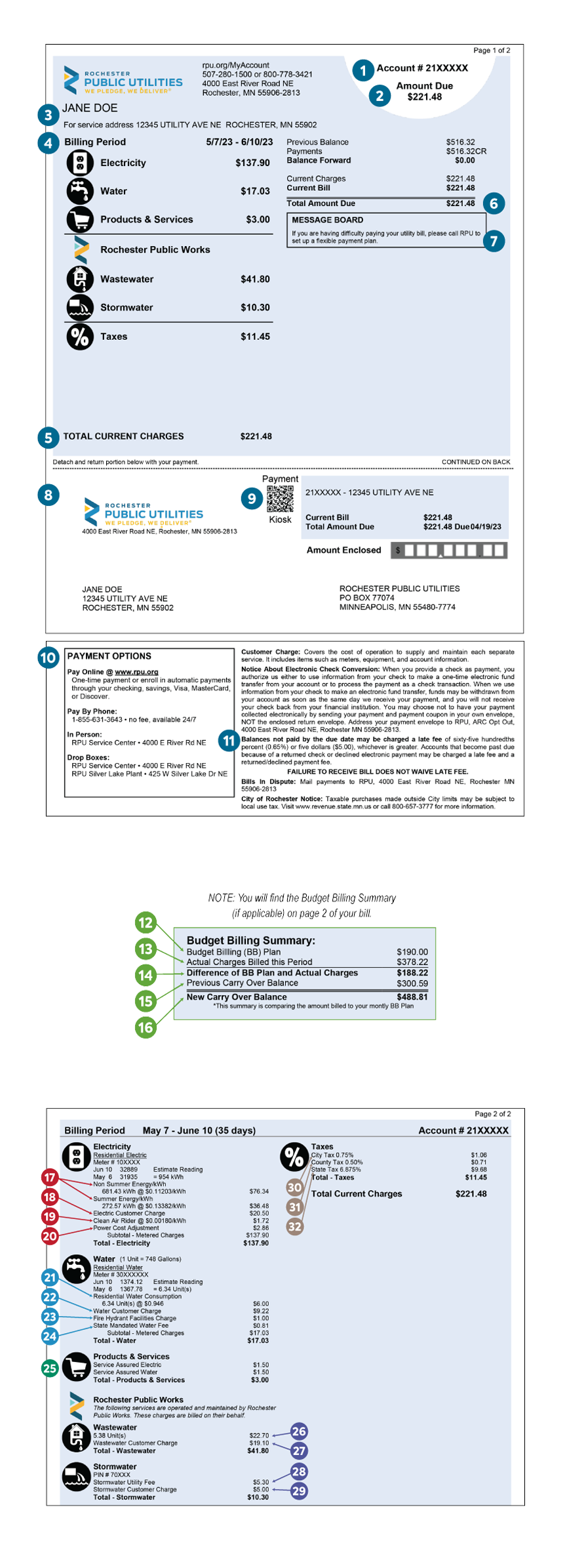
INSTRUCTIONS: If you are viewing this sample bill on a desktop computer/laptop, use your mouse/trackpad to rollover the circled numbers and read the pop-up description for each section. On your mobile phone, scroll down the page to read the corresponding numbered descriptions listed at the bottom.
For a printable version of this, download How To Read Your Bill.
Do you have distributed generation at your home? Check out our How to Read Your Utility Bill with Distributed Generation.
| SUMMARY OF CHARGES | |
| 1 | Account Number is your unique RPU number. Please reference this number when calling us with account or customer service related questions. |
| 2 | Amount Due is the amount to be paid. This total will reflect your previous balance, recent payments, adjustments or credits (if applicable), and current charges. |
| 3 | Account Information includes your account name and service address. NOTE: Accounts with multiple service addresses will not have an address listed here. Please see the back of your bill for specific address details. |
| 4 | Billing Period is the period of time when charges are accrued and billed to your account. |
| 5 | Total Current Charges is the total of each service (i.e. Electricity, Water, etc.) and any applicable taxes summarized for the current billing period. NOTE: See the back of the bill for meter readings and usage. |
| 6 | Total Amount Due is your amount to be paid. This total will include any activity since your last bill, showing your previous balance, recent payments, adjustments or credits (if applicable), and current charges. |
| 7 | Message Center is the area where important messages from RPU are communicated - general and/or account specific. |
| 8 | Payment Stub (front) is the bottom portion of your statement that should be returned when mailing in your payments. This will include the amount due and the due date. If you are on autopay, this portion will indicate the date and the amount to be deducted. |
| 9 | Payment Kiosk QR Code is an image you can scan with your mobile device's camera to be taken to RPU Connect. |
| 10 | Payment Options includes information regarding payment options. |
| 11 | Payment Stub includes compliance information, electronic check conversion, and late penalty terms. |
| BUDGET BILLING SUMMARY (if applicable) | |
| 12 | Budget Billing (BB) Plan is your monthly Budget Billing (BB) amount. |
| 13 | Actual Charges Billed this Period is the total of your actual charges during the current billing period. |
| 14 | Difference of BB Plan and Actual Charges is the difference between your monthly Budget Billing (BB) amount and your actual charges during the current billing period. |
| 15 | Previous Carry Over Balance is the balance from your previous billing period. |
| 16 | New Carry Over Balance is the cumulative account balance at the end of each billing period. This balance takes into account your actual charges, your monthly Budget Billing (BB) Plan, your previous carry over balance, and assumes the recent Budget Billing (BB) amount billed is paid in full by the due date. NOTE: This balance could be a debit or credit.‘CR’ indicates a credit. |
| RPU CHARGES: ELECTRICITY | |
| 17 | Electric Usage Charge is the total metered kilowatt-hours (kWh) used. The rate per kWh is then multiplied by the kWh used for the current billing period. NOTE: Two energy charges may appear during the transition between summer (Jun-Sep) and non-summer (Oct-May) rates or when any changes to our rates occur (Dec-Jan). |
| 18 | Electric Customer Charge is a fixed charge for all residential customers regardless of electric usage. This charge covers the cost to maintain electric facilities and infrastructure. It also includes costs for meters, distribution poles, safety equipment, miscellaneous supplies, and account administration. |
| 19 | Clean Air Rider covers the bond payments for the Emission Reduction Project (ERP). All residential, commercial, and industrial electric customers are impacted by the charge. The amount you pay on the Clean Air Rider is dependent on your electric usage. The rate of the Clean Air Rider will change each year depending on the debt service payment schedule. The payments are scheduled to be complete by 2030. |
| 20 | Power Cost Adjustment is charged if the cost to supply the electricity needed for our customers exceeds projections. This adjust- ment is made in cases such as high fuel costs, higher market pricing for electricity, or the load is higher than projected. This adjustment is based on your electric usage and varies each billing period. |
| RPU CHARGES: WATER | |
| 21 | Water Usage Charge is the total metered water (Units) used during the current billing period. Each Unit of water equals 100 cubic feet or 748 gallons (1 Unit = 748 gallons). The rate structure is tiered to encourage water conservation. |
| 22 | Wastewater Customer Charge is a fixed charge for all residential customers regardless of water usage. This charge covers the cost to maintain water facilities and infrastructure. It also includes costs for meters, pipes, fittings, excavation tools and machinery, and account administration. |
| 23 | Fire Hydrant Facilities Charge is for the installation, maintenance, and availability of water for the City and other emergency services (e.g., fire department). All residential, commercial, and industrial water customers are impacted by the charge. It is based on the rate class, not the meter size. This charge is not taxed. |
| 24 | State Mandated Water Fee is required by the MN Department of Health and funds the required testing for drinking water. This fee is not taxed. |
| RPU CHARGES: PRODUCTS & SERVICES (if applicable) | |
| 25 | Products & Services is the area where charges for additional offerings will appear such as our Service Assured® Underground Utility Repair Coverage Program and our Carbon Offset Program. |
| RPU CHARGES: WASTEWATER | |
| 26 | Wastewater Usage Charge is how your wastewater charge is determined. For residential customers, the base rate for April–December is determined by your average water usage (Units) during the months of January, February, and March. If your actual water usage in any month of April–December is less than your base rate, you will be charged your actual usage. If you use more than your base rate, you will not be charged more than your base rate. The Wastewater Usage Charge for commercial customers is based on actual water usage (Units). |
| 27 | Wastewater Customer Charge is a fixed monthly charge per sanitary connection that covers the cost to maintain sewer facilities and infrastructure. |
| RPU CHARGES: STORMWATER | |
| 28 | Stormwater Utility Fee collects funds from every developed residential and commercial property in the City of Rochester to support the Public Works Stormwater Management program. Each parcel of land is assigned a parcel identification number (PIN#). The fee is based on the parcel size, land use, and the amount of impervious (hard surface) area. |
| 29 | Stormwater Customer Charge is a monthly charge used exclusively to support the Public Works Stormwater Management program. |
| TAXES | |
| 30 | City Tax is the sales and use tax that the City of Rochester imposes on all taxable items or services in the city, including utility services. The current city sales tax rate is 0.75%. |
| 31 | County Tax is the sales and use tax that Olmsted County imposes on all taxable items or services in the county, including utility services. The City of Rochester falls within Olmsted County; therefore, this tax is required. This tax is used to fund maintenance on roads and bridges, construct public infrastructure, and for other transit and transportation projects within the county. The current county transit tax rate is 0.50%. |
| 32 | State Sales Tax is the sales tax charged by the State of Minnesota on retail sales of taxable products and services, including utility services. The current state sales tax rate is 6.875%. NOTE: Utility services are generally taxable; however, some exemptions may apply. Information can be found on the Minnesota Department of Revenue website to further explain possible sales tax exemptions. Customers who qualify for a sales tax exemption must provide RPU with a valid Certificate of Exemption (ST3 form). |
If you have further questions on your RPU billing statement, please contact RPU Customer Care at customercare@rpu.org or 507-280-1500.